
Home / Employer Center
Everything Employers Need To Successfully Implement And Manage The Plan
Implementation, enrollment, ongoing administration, compliance and employee communication — in one place, in the order you will actually need them.
Section 01
New Group Implementation
A new health plan touches HR, payroll, finance and every employee at once. Here is the sequence, what the plan's partners handle, and the handful of things needed from you. New to the plan? Start with who's who — several names appear on your invoices and ID cards, and they each do a different job.
How It Starts
Your Benefit Consultant submits the new group paperwork to Apex Benefits Partners as general agent, and Apex submits it to Triad Benefits. That submission starts the process. The employer contact named on the application then receives emails with links to the portal and works through the setup items from there. There is no kickoff call to schedule and no named individual to wait on — you are not assigned personal contacts, you get team inboxes organized by the kind of question you have.
See who handles whatCarrier & Administrator Setup
Securus is configured as your administrator on the Cigna PPO network, DisclosedRx as your pharmacy benefit manager, and your FBO claims-funding bank account is established.
Payroll Coordination
Recommended prep, not a plan requirement. Build deduction codes per plan and tier and test them against a sample payroll before go-live. Your team handles this internally with your Benefit Consultant — a payroll error in week one costs more trust than it costs money.
Eligibility Requirements
New hires serve a waiting period you set; overrides go on the New Subscriber Form and require stop-loss approval. Note that premiums are not prorated — a mid-month start bills as a full month.
Enrollment
Employee meetings run by your Benefit Consultant, with live support for members while they're electing. If you use an enrollment platform, configuring it is a separate track your team runs with your Benefit Consultant — it sits outside this implementation.
Ongoing Administration
Monthly invoice reconciliation, eligibility maintenance, mid-year life events, and a compliance calendar we drive rather than remind you about.
Implementation Roadmap
Group Submitted
Your Benefit Consultant submits the paperwork to Apex, Apex submits to Triad Benefits, and the employer contact on the application is emailed portal access.
Portal Setup
Census submitted. In the portal: business details, verification documents, group team, banking and tax information.
Carrier Setup
Securus, Cigna network, DisclosedRx and the FBO claims account configured. Premium contributions entered to finalize the group.
Communicate & Enroll
Toolkit delivered, employee meetings held, members supported through elections.
Day One
ID cards distributed, first invoice reconciled, plan moves into ongoing administration.
Week ranges shown are the standard implementation sequence. Confirm them against your signed timeline — a compressed effective date shortens every phase.
Section 02
Employer Checklist
Five steps, in order. The first three are yours; the last two happen for you. Your progress saves in this browser, so you can close the tab and pick it back up. Detailed guidance for each portal step follows below.
Logging in to the Securus Benefits Portal. Open the portal URL on your phone or computer and enter your email address in the sign-in box. A one-time code is emailed to you — paste it in to finish signing in. There is no password to create or remember. If you are both a group admin and a member on the plan, switch between the two views using the dropdown arrow next to your group name in the top left.
Stuck on any of these? Contact your Benefit Consultant and they will move it forward.
Filling In Business Details
Do this one first — it gates your bank connection. The Details tab collects two things: your invoice preferences and your company information. The company information includes an uploaded document proving the business and showing your EIN, and that upload is what produces the Business Verified status your bank connection depends on. Everything here can be edited later, but nothing downstream moves until it's submitted.
Invoice Preferences
Two choices. Invoice format: a straightforward version broken down by employee, or a detailed version breaking out the fees that make up your health plan. Invoice recipient: the email address of whoever on your team should actually receive the invoice each month — name a person who will read it, not a general inbox.
Portal guideCompany Information
Six fields: your DBA name, company website, a short description of the company, business phone, business address, and your EIN. The EIN is worth a second look — it flows into your tax and compliance filings, and a transposed digit surfaces months later at filing time.
Then Verification Documents
Separately from these fields, the portal asks for two uploads — EIN paperwork and a government photo ID for your primary owner. That is what produces Business Verified, and until it clears, automatic payments stay off. It needs a second person, so read the next block before you start.
What to uploadVerification Documents
Two uploads, and one of them needs your primary owner. The portal requires EIN documentation for the business and a government-issued photo ID for the organization's primary owner. Flag this early: if HR or finance is doing the setup, the ID still has to come from the owner personally — that hand-off is the most common reason onboarding stalls here. Nothing downstream moves until both clear, because business verification gates the bank connection and automatic payments.
EIN Documentation
Upload one document showing your Employer Identification Number: an IRS Form SS-4 or an IRS 147C letter. If you can't find either, the 147C is the one to request — the IRS will reissue it, whereas the SS-4 is your original application.
Request a 147C letterGovernment-Issued Photo ID
For the primary owner of the organization, for identity verification. Accepted: a valid driver's license or state ID, or a passport. A license or state ID needs both the front and the back uploaded. This is a person-level requirement, not a company one — no company document substitutes for it.
Getting The Photo Accepted
Most rejections are photo quality, not eligibility. The portal requires:
- A clear color photo — black and white is rejected
- An actual photo, not a scan or photocopy
- All four edges of the card visible
- Text readable and the ID photo clear
- No glare or shadows across the card
Shoot it flat on a dark surface in indirect light. Overhead light is what causes the glare that gets uploads bounced.
Verification guide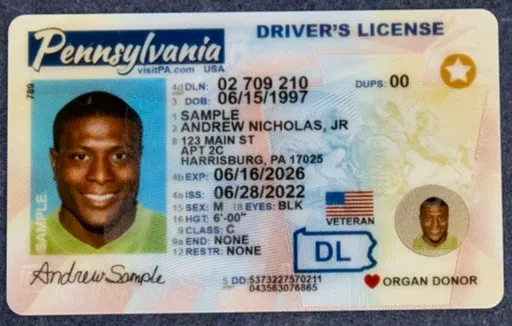
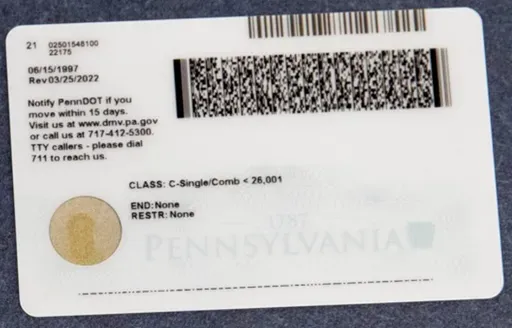

Sample ID shown for illustration. Upload photos of the actual ID — a photo of a screen or a printout counts as a copy and will be rejected.
Connecting Your Bank Account
This is a required step before the plan goes live, and it is the one that most often stalls. In the portal, open Connect Bank Account. The connection runs through Stripe, so you sign in to your bank through Stripe's secure window rather than typing account and routing numbers into a form — the connection is end-to-end encrypted and the plan never handles your credentials. Once connected, monthly invoice charges run automatically on the first business day of each month.
What Has To Happen First
Your business has to be verified first, and that comes from the two verification document uploads — your EIN paperwork and the primary owner's photo ID. Once they clear, the Connect Bank Account screen shows Business Verified. Note what that box actually says: automatic payments turn on only after a bank account is connected. Verified but not connected means you are not done.
Back to the checklistIf The Screen Won't Load
The most common cause is a browser extension blocking Stripe's connection window — the portal itself flags this. Turn off ad blockers and privacy extensions for the page and try again. If you're on a locked-down work machine, a personal browser or asking IT to allow the page usually settles it.
If You Get Stuck
The portal has built-in guidance on that screen for what Stripe is, how your information is protected, why business verification is required, and what to do if your bank is not listed with Stripe — expand those questions before troubleshooting further. Still stuck, email Yuzu Account Management.
Banking guidepartners@yuzu.healthTwo Things That Hold Up Go-Live
An HR Contact On The Group Team
Every group must designate a Human Resources contact. That role receives the onboarding reminder emails and the "Actively at Work" forms used to verify eligibility — so if the seat is empty, the requests have nowhere to land.
Who To Put On Your Group Team
Your Group Team is the list of people with portal access — HR, finance, leadership, and a privacy officer or legal contact if you have one. Add them from the Group Team tab, and mark Is Admin for anyone who should manage team members, banking and business details, and sign documents. Only Human Resources is required. The others are available if you have someone in that role, not expected.
To be clear about what portal access is not. Employers cannot change the plan set-up or edit plan designs from the portal. Those are fixed by the program — portal access is for administering your group, not altering how the plan works.
Human Resources · required
Every group must have one. This role receives the onboarding reminder emails and the "Actively at Work" eligibility verification forms. Leave the seat empty and those requests have nowhere to land.
Privacy Officer · optional
Available if you have someone holding that title — not required. It grants view-only access to sensitive data: coverage claims, coordination of benefits, individual claim detail and attachments. It is also the only role with access to the full report set.
Finance · optional
No special portal permissions attach to the role itself. Useful for whoever reconciles the monthly invoice. Grant portal editing separately with the Is Admin toggle.
Legal · optional
Available if you have in-house counsel or an equivalent. No special portal permissions attach to the role itself — grant portal editing separately with the Is Admin toggle.
Everyone on the Group Team can see the Aggregate, Pharmacy and Medical Claims, Enrollment and Lag reports. Only a Privacy Officer sees the full report set. To remove someone added in error, open their record and click Remove. Step-by-step: Edit Group Team and Role Permissions.
Billing Dates To Build Into Your Month
Invoices guide ↗Invoices generate on the 25th. Funds are drawn on the first business day of the month. That gives you roughly five business days to review the invoice before money moves, so put the review on someone's calendar rather than leaving it to whoever notices. Choose your invoice format in the portal's Details tab — a per-employee summary that is easier to read, or a detailed version broken out by plan fee — and name the person on your team who should receive it.
Section 03
Required Documentation
Everything an administrator needs, categorized and searchable. Every file downloads directly — no portal login, no request form.
Every card above links to documents/<filename>.pdf and goes live the moment the file is there. The exact filenames I've wired are listed in documents/README.md — match those names and everything resolves. The original PlanYear links were tokenized API URLs that won't survive leaving that platform, which is why we're hosting them ourselves.
Section 04
Employer Resources
Ready-built materials so your HR team doesn't have to create them. If you need something that isn't here, ask your Benefit Consultant.
Open Enrollment Toolkit
The full kit: announcement email, benefits-at-a-glance one-pager, plan comparison, election instructions and a meeting deck — branded to your organization.
- Announcement & reminder emails
- Employee-facing plan comparison
- Meeting presentation
Communication Templates
Pre-written, plain-language templates for the messages HR sends every year — new hire welcome, life event reminders, plan year reset, ID card instructions.
Ask your Benefit Consultant for templatesEmployee Flyers
One-page handouts on the things members ask about most: $0 virtual care, using the Cigna network, prescription savings, and the wellbeing programs.
Ask your Benefit Consultant for flyersFAQ Documents
The member FAQ in printable form, plus an HR-facing version covering eligibility rules, waiting periods, proration and termination timing.
See the member FAQCompliance Materials
Required notices, the annual filing calendar, and the documentation you'll want on hand if you're ever audited.
See compliance calendarACA & COBRA Resources
ACA 1095 reporting requirements and timing, plus COBRA administration guidance for terminations and qualifying events.
See requirementsSection 05
Plan Technology
The technology that comes with the plan exists for one reason: to move work off your team's desk. Every tool below either answers a question HR would otherwise have to field, or surfaces something you'd otherwise have to dig for.
Securus Member Portal
Powered by Yuzu Health. Members get digital ID cards, claims and eligibility status, and coverage detail in one place — so they stop routing those questions through HR.
AI Support Tools
The assistant on this site answers benefit questions and routes members to the right page instantly. It's built to say "I don't know, call this number" rather than guess.
Self-Serve Education
Plain-language guides, plan comparisons and the member FAQ — built mobile-first, because employees look this up standing at a pharmacy counter, not at a desk.
Section 06
Compliance Calendar
The filings and notices that come with sponsoring a self-funded plan. The plan's administrative partners drive these — you should recognize them, not manage them.
Who does what. The plan is administered as Triad Benefits, managed by Health Cooperative Strategies. Yuzu Health is the technology partner and third-party administrator — banking, invoicing, portal, and the RxDC submission with the pharmacy benefit managers. Lumelight is the compliance firm: it prepares Form 720 for PCORI and Form 5500 from plan data and emails them to your group contact. Securus supplies claims and eligibility data. Your Benefit Consultant is your point of contact throughout. On the filings below, the employer signs, pays and remains the responsible party — the forms are prepared for you, not filed for you. That distinction is where employers get caught.
The Filings, And Who Actually Files Them
PCORI Fee
Lumelight prepares. You sign and pay. Self-funded employers owe this as part of second-quarter taxes on IRS Form 720 (Box 133). Lumelight builds the form from plan data and emails it to your group contact for signature and payment — the same pattern as Form 5500. The fee is a per-member-per-year rate that adjusts annually and is based on covered lives, not employees, so every spouse and child counts. The portal's PCORI Fee Calculator shows the same math by the snapshot method: average covered lives × the IRS rate.
IRS guidanceForms 1094 & 1095
You file. Form 1095 reports each covered individual's minimum essential coverage; Form 1094 is the cover sheet that transmits them with group summary data. Under 50 full-time employees files the B versions, 50 or more files the C versions. The portal generates a 1095 per employee and one 1094 for the group. Due electronically by March 31.
Forms 1094 & 1095 guideForm 5500
Lumelight prepares. You sign. The annual return/report required under ERISA sections 104 and 4065 and Code sections 6057(b) and 6058(a). The portal produces a Form 5500 Data Summary Table from eligibility data collected across the plan year; Lumelight uses it to prepare the filing and emails it to your group contact for signature. You remain the plan sponsor and responsible party. Due the last day of the seventh month after your plan year ends.
Form MA 1099-HC
The subscriber files; you distribute. Massachusetts' state version of the 1095, used by residents to confirm coverage on their state return. Generated automatically for every Massachusetts resident who was a subscriber during any part of the prior calendar year. Due January 31. Dependents filing their own returns may need figures off the subscriber's form; it may be photocopied. If your group has no Massachusetts residents, it won't appear.
Form MA 1099-HC guideRxDC Report
Yuzu submits — but only if you complete one form. Prescription drug and health care spending data required under CAA Section 204. The PBM supplies most fields; Yuzu may submit P2, D1 and D2. Yuzu can only generate and submit on your behalf once Employee Premium Contributions are entered in the portal. Leave it blank and the obligation lands on you. Either way the Plan Sponsor remains responsible for meeting the requirement.
What to enterCreditable Coverage
Informational. Tells Medicare-eligible members whether the plan's drug coverage is at least as good as Part D — which lets them stay on the plan without a late-enrollment penalty later. The plans administered here generally offer creditable coverage; confirm against your Proof of Insurance letter. Members download it themselves from the Documents tab of the member portal.
CMS guidanceGag Clause Attestation
The plan attests, annually. CAA 2021 Division BB Section 201 bars agreements that restrict the plan from accessing provider-specific cost and quality information or de-identified claims data, or from sharing it with a business associate. Attestation goes directly to the Department through the Health Insurance Oversight System. Yuzu has prepared an attestation letter — a copy sits in the Compliance tab.
New York HCRA Surcharge
Your election. A surcharge on claims at HCRA-designated New York facilities. Electing to pay the state Public Goods Pool directly carries a 9.63% surcharge; non-electing payers who pay providers instead carry an additional 28.27%. Electing means filing monthly electronic reports — every month, payment due or not — dropping to annual filing after a year if liability stays under $25,000. Yuzu does not elect groups. Ask your Benefit Consultant whether your plan designer elects on your behalf.
NY HCRA guidanceWhich Set Applies To You
Three thresholds decide your paperwork. Full-time headcount — under 50 files 1094-B/1095-B, 50 or more files 1094-C/1095-C. Massachusetts residents — any subscriber triggers Form MA 1099-HC. New York services — claims at HCRA facilities raise the Public Goods Pool election. Count all three before filing season, not during it.
It All Lives In The Compliance Tab
Where To Find Everything
The Compliance tab in the left sidebar of the employer portal holds all of it: 1095s for every subscriber, Forms MA 1099-HC, the Form 5500 Data Summary, the PCORI Fee Calculator, the Gag Clause Attestation letter and the Employee Premium Contributions form. A dropdown pulls prior years' tax forms.
The PCORI Calculator's Window
The PCORI Fee Calculator appears when the filing window opens and stays available for one year after your plan year ends. It records the covered-lives count, the total fee, the applicable IRS deadline and the methodology. Pull it before the window closes. Note that Yuzu cannot file Form 720 for you — the form also carries unrelated excise taxes only you can report.
What You Hand To Employees
You must distribute Forms MA 1099-HC to your subscribers. You may distribute 1095s, but members can pull their own from the member portal, as they can their Proof of Insurance letter — point them there rather than fielding requests one at a time.
Contract Terms To Know
Every term below is drawn from the signed Triad Group Contract — the Health Program Participation Request/Contract executed by the employer. This is a plain-language summary for planning purposes. The signed documents govern in all cases, so read them before you rely on anything here. Download the application
Effective Dates & Term
Your requested effective date is a non-binding request. The actual Effective Date is always the first day of a month. The initial contract runs twelve months from that date, and renewal contracts run in subsequent twelve-month periods. The employer may terminate only upon renewal.
Your Plan Year Is An Election
Section 10 of the contract has you elect either a plan year running from your effective date or a calendar year. You also elect whether COBRA is administered by the TPA or an outside vendor, and whether your contribution is a percentage or flat rate for each of the four tiers.
Billing, ACH & The 30th
Invoices arrive by email and are billed on the census of record as of the date the invoice generates — so census changes move your fees. Payment is due the 1st and drafted by ACH on or about the first business day. It is late after the 30th, at which point the group is subject to termination if not paid in full.
Termination Notice: 15 Days
Member and dependent terminations go to the MGA or TPA on the appropriate form at least fifteen days before the requested date. Miss that window and the termination is delayed no less than thirty days, with fees still owed for the delay. Terminating before the end of a term also requires the equivalent of ninety days of healthcare fees.
Underwriting Accuracy
The employer must report health changes to the Program before the approved effective date, even after rates are approved. Intentionally inaccurate health information during underwriting allows the Program to rescind back to the original effective date — meaning coverage was never in effect, and the employer accepts liability for claims incurred but not paid.
Eligibility & Good Standing
Coverage requires being an eligible member of Triad Benefits, LLC in good standing. Full time means 30 or more hours per week and under age 65; the Program may request wage and tax records as verification. Fees may be modified based on experience, utilization or demographic change, and the Program may decline to renew at its sole discretion.
Summaries of Benefits and Coverage are available at triad.health, and a hard copy can be provided on request. Healthcare fees are remitted monthly and, after administrative expenses, the remaining balance is designated as your group's claims fund account.
Dates and rates here come from the plan's administrative guides: March 31 for Forms 1094 and 1095, January 31 for Form MA 1099-HC, the last day of the seventh month after plan year end for Form 5500, and second-quarter taxes for PCORI. Forms 720 and 5500 arrive from Lumelight by email — watch for them and check the figures before signing, because accuracy rests with the signer, not the preparer. Yuzu has previously asked for Employee Premium Contributions by mid-April ahead of RxDC submission; confirm the current year's cutoff with Triad Benefits. The New York HCRA rates shown apply to services rendered through December 31, 2026 and will need re-checking after that.
Section 07
No Surprises Act & Payment Disputes
Self-funded plans carry the dispute exposure that a fully-insured carrier would otherwise absorb. Here is how out-of-network payment fights actually run, who pays the fees, and the one outcome that lands back on the group.
Yuzu handles negotiations and disputes, and covers the fees. Yuzu negotiates during the Open Negotiation period, represents the plan through Independent Dispute Resolution, and pays the IDR administrative and entity fees. The group's exposure is the payment determination itself — if the arbiter sides with the provider, the group pays the determined amount.
What The Law Protects
The No Surprises Act shields members from unexpected bills when they get care from an out-of-network provider in a situation they didn't choose or couldn't reasonably avoid — emergency services being the clearest case. In those situations the member's cost-sharing is based on the Qualifying Payment Amount, not what the provider billed.
How The QPA Is Set
Per CMS, the QPA is the median of contracted rates the plan recognizes for the same or similar service, from a provider of the same or similar specialty or facility type, in the same geographic region, adjusted for inflation. Yuzu's per-claim methodology follows that standard using Serif and Cigna contracted-rate datasets, depending on the plan's network.
Open Negotiation: 30 Days
A provider who disputes the payment shown on the EOB may open negotiations. That must be initiated within 30 days of payment or denial, and the negotiation period runs up to 30 business days. Most disputes end here.
If It Goes To IDR
With no agreement, the provider may initiate Independent Dispute Resolution. Each side submits a final offer to a certified IDR entity and the arbiter picks one — there is no splitting the difference. The plan pays a $115 administrative fee plus an entity fee, roughly $200–$800 for single determinations and $268–$1,173 for batched ones. The entity fee is refunded when the determination favors the plan. Yuzu covers both fees.
Where The Group Is Exposed
If the determination favors the provider, the plan pays the determined amount directly to the provider within 30 calendar days, and the group is expected to fund the full amount. Yuzu reprices the claim to match. If stop-loss rejects the repriced claim, Yuzu notifies the group to ask how it wants to proceed — that is the scenario worth understanding before it happens.
Reference-Based Pricing Plans
RBP plans benchmark reimbursement to something like a percentage of Medicare rather than negotiated network rates, and often have no formal network — which creates friction under the NSA. Providers who reject an RBP payment must go through IDR rather than bill the patient. Balance billing stays prohibited for emergency services and air ambulance regardless of whether the plan has a network.
Using an outside vendor for Open Negotiations and IDR instead of Yuzu is supported — your Benefit Consultant notifies Yuzu's partner team with the vendor's contact information, and NSA-eligible EOBs then carry that vendor's details. IDR administrative and entity fee amounts are set by regulation and adjust over time; confirm current figures before relying on them.
Section 08
Who's Who — And Who To Contact
Several names appear across your invoices, ID cards and explanations of benefits. They are not competing vendors — each one does a specific job. Here is the map, and the right inbox for each kind of question.
Why one system has two names. Yuzu Health is the technology platform and third-party administrator behind the plan. Securus Benefits is the white-label name that same platform carries on member-facing materials. So you will see Yuzu on billing and invoicing, and Securus Benefits on ID cards, explanations of benefits and member communications. Same system, same data, different name on the front — nothing has gone wrong if an employee's EOB says Securus while your invoice says Yuzu. Care is delivered through the Cigna nationwide PPO network, and pharmacy runs through DisclosedRx.
Triad Benefits
The program. Managed by Health Cooperative Strategies. Triad Benefits, LLC is the entity named on your Group Contract, and membership in good standing is a condition of coverage. The program sets underwriting guidelines, healthcare fees, renewal terms and participation requirements.
See contract termsYuzu Health
The technology and TPA. Runs the employer and member portals, banking and claims funding, invoicing, and the RxDC submission. This is the name you'll see on billing. Yuzu also negotiates and defends out-of-network payment disputes on the plan's behalf.
See dispute handlingSecurus Benefits
The member-facing brand. The same Yuzu platform, presented to your employees as Securus Benefits. This is the name on ID cards, EOBs and member materials, and the care team members call for claims, eligibility, ID cards and help finding a provider.
Lumelight
The compliance firm. Prepares IRS Form 720 for the PCORI fee and Form 5500 from plan data, then emails them to your group contact for signature and payment. Watch your inbox at filing time — the signature and the accuracy are yours.
See the filingsDisclosedRx
The pharmacy benefit manager. Formulary and tier placement, prior authorizations, mail order, specialty medications and copay assistance. Also supplies most of the fields in the annual RxDC report.
FormularyYour Benefit Consultant
Your advocate. Plan design, renewal strategy, claims review, budgeting, and escalation when an answer you got isn't the right one. Everything on this page can be routed through them if you'd rather not manage it directly.
Yuzu Teams, And What Each One Handles
Work whichever way suits you — but keep your Benefit Consultant in the loop. If you'd rather have one point of contact, send everything to your Benefit Consultant and let them route it. If you prefer going straight to the source, do that — just copy your Benefit Consultant on the thread. They can only advocate for you on something they can see, and a decision made in a conversation they weren't part of is one they can't help you with later.
Account Management
Plan configuration, compliance, group eligibility, and the contracts your group signs. All onboarding questions run through here, up through your first invoice. Vendor integration questions too.
partners@yuzu.healthSupport
Future claims. Whether something will be covered, and eligibility questions looking forward. If the care hasn't happened yet, this is your inbox.
support@yuzu.healthClaims
Claims already processed. Appeals, payment status, and eligibility as it affected how a claim was handled. If the care already happened, start here rather than with Support.
claims@yuzu.healthAccounting & Finance
Payments and payment status, reporting questions, and flexible funding policy — the arrangement where a group funds less than its maximum liability.
accounting@yuzu.healthNSA Disputes
Open Negotiation initiations and Independent Dispute Resolution on out-of-network claims. Also where an outside vendor handling your disputes gets registered.
disputes@yuzu.healthHRIS Configurations
HRIS and eligibility feed questions, and HRIS onboarding. If your employee data flows in from a payroll or HR system, configuration questions go here.
HRIS@yuzu.healthMembers should still call the Securus care team first for anything health-related — claims, eligibility, ID cards or finding care. These inboxes are for employer and Benefit Consultant administration, not a member support line.